

Technology resources
The Hawkesbury Library Service provides the following technology resources:
Computers and internet
Computers with internet access are available free of charge to members at both Libraries.
You must use your Library card to use the self-service computer booking system. For one-time only or short term users Library visitor cards are available. Fees apply.
If you have overdue items you will be unable to book a computer.
Public Computer access time is as follows:
- Windsor Library - 4 hours per day
- Richmond Library - 2 hours per day
You are able to download but you must ensure removable devices are compatible and virus free. You must complete downloads before your session ends.
Users need to comply with the Library’s Public computer and internet access and use policy (pdf - 97.5 KB).
Software on public PCs
The Library’s PCs have the following software installed:
- Microsoft Office 2016 (Word, PowerPoint, Publisher & Excel)
- Adobe Creative Cloud
- Google Chrome
- Audacity – Audio Editor/Creator
- ZoomText
Adobe Creative Cloud
Adobe Creative Cloud is currently available on dedicated PCs at Windsor and Richmond. Adobe create cloud provides a number of high quality multimedia applications including:
- Photoshop (Ps) - Transforming and manipulating photos and images.
- Illustrator (Ai) - Vector graphics and illustration.
- InDesign (Id) - Page layout design.
- After Effects (Ae) - Video editing with a focus on animation.
- Premiere Pro (Pr) - Video editing and filmmaking.
- Adobe XD (Xd) - UX/UI design.
- Lightroom (Lr) - Photo editing.
- Acrobat DC - Editing and creating PDFs.
- Media Encoder (Me) - You need this to turn your video creations into rendered products. It works in conjunction with Ae and Pr.
- Camera Raw - This works in conjunction with Ps to allow you to edit RAW photos. Lr doesn’t require the use of this to edit in RAW.
- Premiere Rush (Ru) - For creating and sharing videos online.
- Dreamweaver (Dw) - For designing responsive websites with code.
- Bridge (Br) - Collates your creative assets.
- Audition (Au) - Adding audio to stories.
- Animate (An) - An animation tool.
- Character Animator (Ch) - Create a character and animate it in real-time.
- Dimension (Dn) - Designing in 3D.
- InCopy (Ic) - This allows you to collaborate with teams of writers and copywriters.
Free wifi
Free wifi is available at both Libraries and their surrounds.
Bring your own laptop, tablet or wireless device and connect to the Internet free of charge.
For information on connecting your own laptop, tablet or wireless device to the Library wireless network please ask staff for details.
The Library takes no responsibility for wireless internet access, for technical problems or failure to access sites and software.
Users need to comply with the Library’s Public computer and internet access and use policy (pdf - 97.5 KB).
Computer training
The Library provides free access to the Computer School - a computer training website that is available for use by Library members in the library and off site. You can undertake tutorials on computer applications, email, the internet and social networking at your own pace. Introductory computer training is also available for those new to using computers. For information or assistance please contact us.
The Library also runs computer classes periodically. For dates and times look at our What’s On page.
The Library also provides various learn technology online opportunities. Please visit our Self-Directed Online Learning page for a complete list.
Tech Help
Hawkesbury City Library offers a Tech Help service that is provided free of charge. This service provides assistance with basic technical assistance, guidance and educational support to library patrons.
Bookings are essential and can be made by phone on 02 4560 4460 or via Eventbrite.
Tech Help Session date/times and locations are as follows:
Windsor Library Tech Help: Every Monday 11am - 12pm
Richmond Library Tech Help: Every Thursday 2pm-3pm
Photocopying, printing and scanning
A Library card is required for photocopying, scanning and printing in both libraries. For one-time only or short term users Library visitor cards are available. Fees apply.
Black & white and colour photocopying and printing, is available at both libraries. Fees apply
You can submit a print job through Webprint. The job will be able to be released from the printer when you get to the printer.
Self service scanning is free.
Please check the copyright restrictions displayed near the machines before copying.
Disc Cleaning
CDs, DVDs or Blu-ray discs can be dropped in at either Windsor or Richmond for cleaning with the Library’s Disc Repair machine. The machine effectively removes light to moderate scratches, but unfortunately cannot repair cracked or chipped discs. Turn-around time is usually 1 week dependent on staff availability. Fees apply
Desktop magnifier
A desktop magnifier (or CCTV) is available in-Library (Windsor only).
The machine’s large 24” screen, high range of magnification (up to x100), variety of colour contrast modes and a speech feature helps people with a vision impairment to easily read a range of documents.
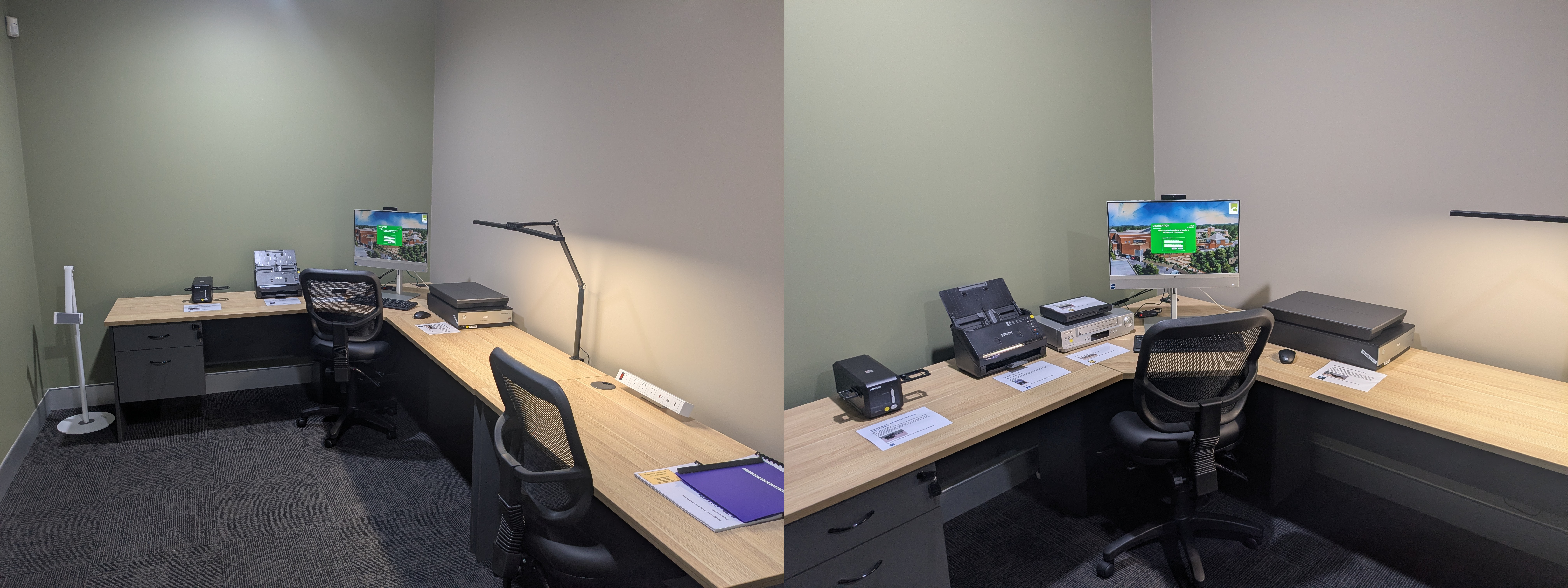
Digitisation Studio
Do you have bundles of holiday snaps, Christmas get togethers or boxes of old family photos that you would like to have in a digital format?
Get excited, the brand-new space for Hawkesbury Library Service, with digitising equipment will be available to use from Monday 16 February at the Central Library, 300 George Street Windsor.
This new space was made possible through grant funding from the NSW Government under the Public Library Infrastructure Grant program.
Click here to learn more and get started!
Production Studio
The Hawkesbury Library Service is excited to introduce our Production Studio — a dedicated space for the community to record and produce audio projects. Whether you're just starting out or building your skills, the studio provides the tools to help you create with confidence.
Our soundproof room has been lined with acoustic paneling to help reduce outside noise and create clear, high-quality recordings.
The room is equipped with the following equipment:
- x1 RØDECaster Pro II — an all-in-one audio production console
- x4 RØDE PodMic
- x4 RØDE NTH-100 headphones
- x1 Softbox Lighting kit
Before booking, please read our Terms and Conditions for use of the room.
New to the equipment or unsure where to start? We've got you covered
Explore our user guides to help you get started:
- A comprehensive guide on using the RODECaster Pro II
- A friendly introduction into recording in our Production Studio
So, what are you waiting for? Book now and let’s get creative!

Page ID: 288257
